
How Big Can This Photo Print?
Found a little note tucked in with your order? One of your photos was a bit short on detail for the size you picked. It happens to everyone, and it's easy to get right next time. Here's what resolution means, and how to know how big any photo can print.
Resolution, in plain English
Resolution = pixel count
Every digital photo is made of tiny dots called pixels. Resolution is simply how many it has, like 3024 × 4032.
DPI = dots per inch
DPI (or PPI) is how tightly those pixels are packed onto paper. The more pixels per inch, the crisper the print.
300 is the magic number
For the sharpest print, aim for 300 pixels for every inch of paper. That one rule tells you how big any photo can go.
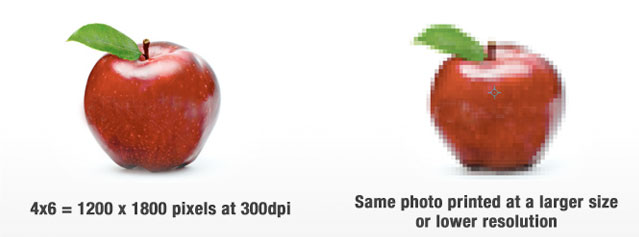
The 300 rule
Multiply your print size by 300 to see how many pixels you need, or divide your photo's pixels by 300 to see how big it can print.
Half the pixels (600 × 900 for a 4×6) is about the limit. Below that, prints start to look soft or jagged.
How many pixels do I need?
Type in the print size you want and see how many pixels your photo needs. Then compare it to your photo's size (how to find it).
Same photo, different sizes
The photo in your camera roll is full of detail. Copies saved from apps and screens usually aren't.
Instagram shrinks photos to about 1080 pixels wide. That's lovely for a 4×4 or a mini print, but not much bigger. For anything over 4", print the original.
Monthly 4×4 favorites →Facebook & texts
Facebook squeezes photos down so feeds load fast. A Facebook copy printed larger than 4×6 will look pixelated. Social media isn't photo storage.
Why Facebook isn't storage →Your screen
Screens show photos at a low 72 DPI, so a photo can look perfect on your phone and still be too small to print big. Paper shows every pixel.
See why on the pixels page →Find your photo's size
Tips for sharp, beautiful prints
Why is my photo too small to print?
The pixels page walks through it step by step, with the Skittles jar, a full size chart, and easy fixes.
Resolution FAQ
How do I know how many pixels my photo has?
On a phone, open the photo and tap ⓘ or swipe up to see its dimensions. Divide the width and height by 300 to find the sharpest print size. For example, 4200 pixels ÷ 300 = 14 inches.
How will I know if a photo is too small before I order?
Choose your print size when you place your order, and you'll see a low-resolution warning if the photo is too small. Once in a while a photo gets flagged and still prints just fine. If you're unsure, place the order and email support@persnicketyprints.com. The team will take a look and cancel or refund if needed.
Can I print photos saved from Instagram?
Yes, small. Instagram compresses photos to about 1080 pixels, which works for a 4×4 or mini prints. For anything larger than 4", use the original photo.
Why do Facebook photos print blurry?
Facebook compresses photos so they load quickly as you scroll. A Facebook copy printed larger than 4×6 will look pixelated, so print from the original whenever you can.
Still not sure?
Send the photo over and the team will tell you how big it can print. Email support@persnicketyprints.com or call 801-225-7020.
Your pictures matter. Your memories matter. Print them.